
Workouts in Repstra are built from blocks, so one builder covers everything from a straight 5×5 to a 16-station Hyrox simulation with race distances.
- 1
Start a new workout
Go to Training → Workouts and click + New workout. Already have the session written down somewhere? Import from text/photo lets you paste or snap it and SOVARA structures it into blocks for you to review.
- 2
Name it and add blocks
Type a name — from that point the editor auto-saves as you work (you'll see Auto-saved ✓). Then add structure with the block presets: + Warm-up, + Main lift, + Accessories, + Circuit, + Interval, + AMRAP, + Timed, + Event Sim, + Zone Cardio, + Cool-down.
- 3
Add exercises from the library
The left-rail Library searches every exercise — filter All / Platform / Custom, or tap a muscle chip. Click an exercise to append it, or drag it onto a specific block. Each row takes Sets, Reps, Rest (s) and Tempo, and the ⇆button swaps in an alternate you've defined.
Building for events? An Event Sim block takes stations with distances and reps — and + Hyrox template drops in all 16 stations at full race distances in one click. Zone Cardio blocks take an activity, duration and HR zone (Z1–Z5).
- 4
Refine with SOVARA
The slash bar above the canvas takes commands like /scale 1.1, /swap squat to lunge, /deload or /explain. SOVARA drafts the change and shows it as a diff for you to accept or reject — your programming, your call, always.
- 5
Assign it
Once saved, the header grows Assign to client → (schedule this workout) and Copy to client → (give them their own editable copy). Or drop it into a program — see building a program.
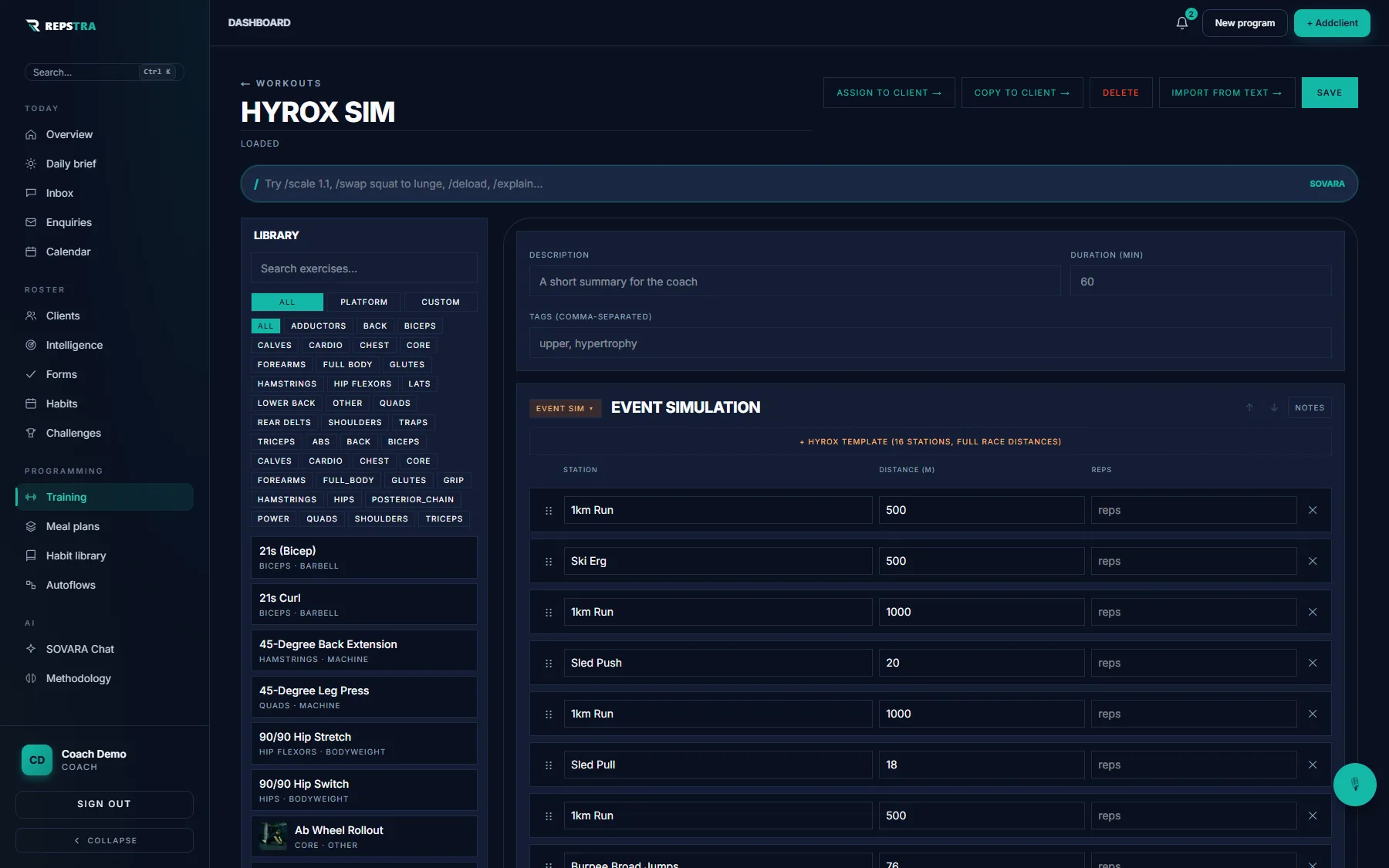
The editor on a Hyrox simulation — Event Sim block, library rail, SOVARA slash bar.